
Global scripts & breakpoints
The script manager wires four hook points along a request. Breakpoint configuration combines manual rules, script rules, and groups to decide when to pause or auto-mutate.
Four script phases
- ① Before request breakpoint: e.g. decrypt query/body so filters and manual breakpoints see plaintext.
- ② Before forwarding: rewrite plaintext or re-encrypt before it leaves to the origin.
- ③ After forwarding, before response breakpoint: preprocess downstream (e.g. decrypt).
- ④ After response breakpoint, before the client: final shaping (e.g. re-sign or re-encrypt).
Each phase has its own editor, enable switch, format, and save. Syntax/runtime issues surface in the script execution log.
In the script manager, click a phase to open the editor dialog. The title shows the phase index and label (e.g. ② Before forwarding); use Enable script at the top, Format on the right, then Cancel or Save at the bottom.
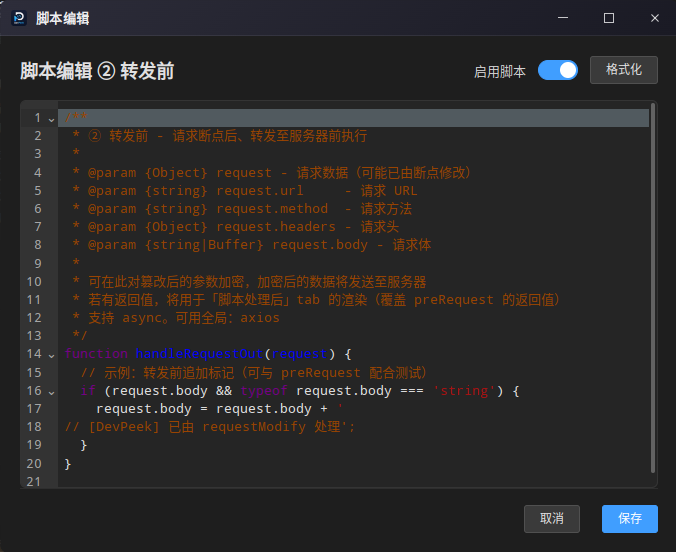
Phases, hooks, and entry functions
The script manager stores one script per phase. The Hook column matches internal phase names (storage and log labels). Entry function names must match exactly or that phase will not run.
| Phase (UI label) | Hook | Entry function | Parameters |
|---|---|---|---|
| ① Before request breakpoint | preRequest | handleRequestIn | request |
| ② Before forwarding | requestModify | handleRequestOut | request |
| ③ After forwarding, before response breakpoint | postForward | handleResponseIn | response, request |
| ④ After response breakpoint, before the client | responseModify | handleResponseOut | response, request |
Entries may be async or return a Promise; the runner awaits completion before continuing the proxy chain. Each phase is still subject to per-run timeouts and other limits.
Sandbox globals (APIs)
These identifiers are injected into the global object of the vm sandbox (not the full Node.js global). Anything not listed here—require, process, import, fs, etc.—is unavailable.
- console: log, warn, error, info, debug, trace, dir, dirxml, table, assert, count, countReset, time, timeEnd, group, groupCollapsed, groupEnd. When script logging is enabled and the request participates in log collection, most calls are also mirrored into that request’s script log.
- Buffer, Promise, JSON, Math, Date.
- parseInt, parseFloat.
- encodeURIComponent, decodeURIComponent, encodeURI, decodeURI.
- btoa(str), atob(str): Base64 helpers backed by Buffer, similar to browser namesakes.
- crypto: Node’s built-in crypto module (hashes, symmetric/asymmetric crypto—see Node docs).
- axios: issue HTTP(S) requests from scripts; behavior depends on local networking, DNS, and remote policies.
- Not exposed: require, process, module, exports, filesystem, child processes, arbitrary Electron main-process access, etc.
Scope and limits
Global scripts run inside the DevPeek desktop proxy process. Each matched session enters a Node.js vm sandbox per phase. They are not the same as breakpoint “script rules” (match/handle on individual breakpoint rules)—do not mix the two.
- Traffic: only HTTP(S) flows forwarded through the DevPeek proxy on your machine; a phase must be enabled and saved in the script manager to run.
- Granularity: all four phases may run for one request; each phase receives its own request/response object to read or mutate.
- Pipeline order: ① before the request breakpoint; ② after the request breakpoint, before sending upstream; ③ after the origin response arrives, before the response breakpoint; ④ after the response breakpoint, before returning to the client.
- Wire-level changes: mutate the passed-in request/response (e.g. body, headers) to change bytes sent upstream or downstream. That is separate from “return values” used for on-screen previews below.
- multipart caveat: when Content-Type is multipart, the implementation avoids replacing the entire upload stream with a rewritten request.body so boundaries stay intact (the script still runs; logs and previews still apply).
- Sandbox: only the globals listed under “Sandbox globals (APIs)” above; no require, process, filesystem, or other uninjected surfaces.
- Timeout and failures: each entry (including async/await) has a short wall-clock budget; on throw or timeout the phase is treated as failed, a summary is written to the script log, mutations from that phase are not applied, and the proxy falls back to the original bytes where possible.
- In response phases (③④), the `request` argument is built from the stored “original request” snapshot (first-recorded URL/method/headers/body text) for reference; it may not match the final upstream bytes after earlier phases.
Return values and the UI
Phase entries (handleRequestIn, handleRequestOut, handleResponseIn, handleResponseOut) may return nothing (undefined). A return value only shapes the text shown under the “script” side of capture details; it does not automatically assign request.body/response.body—mutate those in code if the wire payload should change.
On success: if you return undefined or null, the Script-shaped tab shows the in-memory body after your mutations. A string is shown as-is. Objects/arrays render as indented JSON. Numbers and booleans become stringified.
If multiple phases return a non-empty display value, later phases overwrite earlier ones: ② over ① on the request side; ④ over ③ on the response side.
In request details, when a Raw snapshot exists and a script phase succeeded, inner tabs let you flip between Raw and Script-shaped; the Script-shaped view prefers the latest return-based text, otherwise the mutated payload. List rows may also expose script-related columns or keyword search over script output.
Example code
① Before request breakpoint: parse JSON, rewrite body, return an object for the script tab
function handleRequestIn(request) {
  console.log('[preRequest]', request.method, request.url)
  if (typeof request.body === 'string' && request.body) {
    try {
      const data = JSON.parse(request.body)
      request.body = JSON.stringify(Object.assign({}, data, { touchedByScript: true }))
      return { topLevelKeys: Object.keys(data) }
    } catch (e) {
      console.warn('body is not valid JSON', e && e.message)
    }
  }
}
② Before forwarding: async entry returning a string
async function handleRequestOut(request) {
  console.log('[requestModify] about to forward', request.url)
  // async is supported: you may await axios.get(...) here
  return 'forwarding, header count=' + Object.keys(request.headers || {}).length
}
Debugging
Use console.log / warn / error: when the session is tied to a DevPeek row, output is collected in the script execution log (from the settings menu), tagged by phase—cross-check with the Script-shaped tab in details.
Watch the terminal or system console where DevPeek was launched: the script runner also prints a summary to the main-process console when user code throws.
If a phase is disabled, empty, throws, or the entry function is missing, that phase is skipped. Confirm enable/save first, then narrow URL guards and bisect with early returns.
Breakpoints: manual rules
In breakpoint configuration, add manual rules: URL patterns (*), protocol, method, optional body/query keywords or key=value groups. Each rule must pick Req and/or Res to break on request, response, or both.
With auto-breakpoint, tamper fields can auto-continue when tamper content is present; leave them empty to enter manual breakpoint until you continue or abort in the UI. You can replace or merge headers/bodies; some response-header tweaks remain timing-dependent.
How auto-breakpoint “tamper” fields hit the wire: request headers are parsed from multi-line “Header: value” text into a map (keys lowercased; later lines override the same key). When the rule matches and auto-continues because tamper content exists, each listed key is applied with setHeader before the request goes upstream—**per-field overrides**, leaving unlisted headers untouched. Request body: if the request-body tamper box is non-empty, the upstream body is **fully replaced** (UTF-8) by that text—not appended to the original—and Content-Length is updated when possible; header-only tamper leaves the original body bytes. Response headers: **shallow-merged** into the current response header map (tamper keys override). Response body: the tamper text **fully replaces** the original response body (UTF-8). If auto-breakpoint is on but all tamper boxes are empty and breakpoint mode stays the default manual mode, the hit still enters a manual pause until you continue or abort.
Use breakpoint settings to maintain a flat **standalone rules** library. The proxy applies **only one active rule at a time**: config stores a single active rule id—rules are not evaluated in parallel and not chained. Switch under **Menu › Proxy › Breakpoints** → the “start breakpoint” submenu: all rules are listed, the active one shows a ✓ prefix; choosing another row moves activation to that rule; choosing the checked row again stops breakpoints. An empty library shows a disabled hint. Older “configuration group” flows may differ after migration—follow your installed UI.
Breakpoints: script rules
Script rules implement match(...); optionally return handle(...). On the request side, handle(...) may return an object carrying the body field to mutate and continue, or an object with pause: true to pause manually. On the response side you can return bodies, full status/headers/body, or use pause. Follow the in-app editor for exact shapes.
Script rules: injected data and handle semantics
Breakpoint scripts run in an isolated vm. The runner injects only the phase arguments plus your match/handle definitions—**not** the script-manager globals such as axios, crypto, or Buffer. Work off the provided objects (string transforms), or move outbound calls to the global script hooks.
- 'https'
- Response tab: match(request, response) is required. response carries status, headers, and body for the current downstream snapshot. handle(request, response) is optional.
handle return values: undefined, null, or true means no object-level tamper payload from this step (pause behavior still depends on pause and breakpoint mode). For a plain object: pause: true enters a manual breakpoint; you may include body as the initial editor payload. Without pause, non-empty body and/or headers triggers the auto-continue path: body **replaces the whole** message as UTF-8 bytes; headers override by name (request: setHeader per key; response: shallow merge). Headers-only changes leave the body unchanged.
Like manual auto-tamper: a returned body always **replaces** the wire payload; nothing auto-appends. To suffix HTML, read response.body in handle, concatenate, then return an object whose `body` property is the full new payload.
Rough per-run limits: match ≈ 2s, handle ≈ 5s (per build); timeouts fail the script and behave as no match/tamper.
Pipeline vs manager hooks: the **request breakpoint** runs after global ① preRequest and before ② requestModify, so match(request).body is read from the buffered upstream payload at that moment—usually reflecting in-place edits from ①. Stage ② has not run yet, so its output is not visible to this breakpoint script. The **response breakpoint** sits after ③ postForward and before ④ responseModify, so response.body in match/handle is generally the downstream body after ③. Global hook **return values** are not exposed as extra properties on the breakpoint vm (they only drive the capture “script” view). If ① returned a non-empty display string, the session stores a pre-request snapshot and **response-side** breakpoint code builds the `request` argument’s `body` from that snapshot first—useful to align with the UI return text—and it can diverge from literal upstream bytes if you mostly return and barely touch `request.body`; prefer mutating `request.body` in ① when you need wire and breakpoint inputs to match.
Example: suffix an HTML response
function match(request, response) {
  var ct = (response.headers && response.headers['content-type']) || ''
  return String(ct).toLowerCase().indexOf('text/html') >= 0
}

function handle(request, response) {
  var body = response.body == null ? '' : String(response.body)
  return { body: body + '
<!-- DevPeek: injected -->
' }
}
Script log window
Script log aggregates per-phase output—cross-check with the “script” view in the list. Clear behavior depends on the build.
Breakpoints and scripts change live traffic—get approval on shared environments and keep rollback plans.