
Map Route / Forward
**Forward rules** (Map Route) match a Host or Host + Path prefix and send requests to another machine, protocol, or port. The client keeps the original URL; Capture, Mock, and page debugging honor the same rules.
When to use it
Common scenarios:
- **Forward rules**: point a production API to localhost or staging (client URL unchanged).
- **Param transform**: decrypt encrypted params for reading and Mock.
- **Mock**: temporarily change request or response content.
Combine all three—**no phone hosts file or in-page API base URL change**.
What it does and does not do
Each rule is “match host[/path] → target address”. On hit DevPeek only changes **which server actually receives the request**, not:
- The URL or Host header the browser/app sends (still the original domain).
- The **original** URL/host shown in the capture list and detail panes.
- Bodies themselves (unless Mock or param transform handles them later).
When it applies
Traffic must go through DevPeek. Saves apply to **new connections / requests**. The longest path prefix wins; equally specific rules then follow list order.
A common pattern maps a production HTTPS hostname to a local HTTP server, e.g. `api.example.com` → `http://localhost:3300`. The client still uses HTTPS; DevPeek must decrypt that hostname first (root CA trusted on the device, host in the SSL allowlist), then connect to the local port over plain HTTP. Local dev servers usually speak HTTP only—write the target with an `http://` prefix.
Rule syntax
Rules are plain text, one per line:
- Format: `host[:port][/path-prefix]` + **tab or space** + `target host[:port]` or `http(s)://host[:port]`.
- Lines starting with `#` are comments; disabling a row in the sidebar adds `#` at the front—saved immediately.
- Host supports wildcards. Path is a prefix match and the longest prefix wins; `api.example.com/v2/orders` does not affect `/v1/users`. A match-side port restricts that rule; no port matches any port.
- Target port precedence is explicit port → target scheme default → request port. Local dev servers usually speak HTTP, so write `http://localhost:3300` explicitly.
Example
# Forward rules
# Each line: match pattern → target host[:port]; lines starting with # are comments
#
api.example.com/v2/orders	http://127.0.0.1:8080
*.staging.example.com	localhost:3000
h5.example.com	http://localhost:3300
Configure and manage
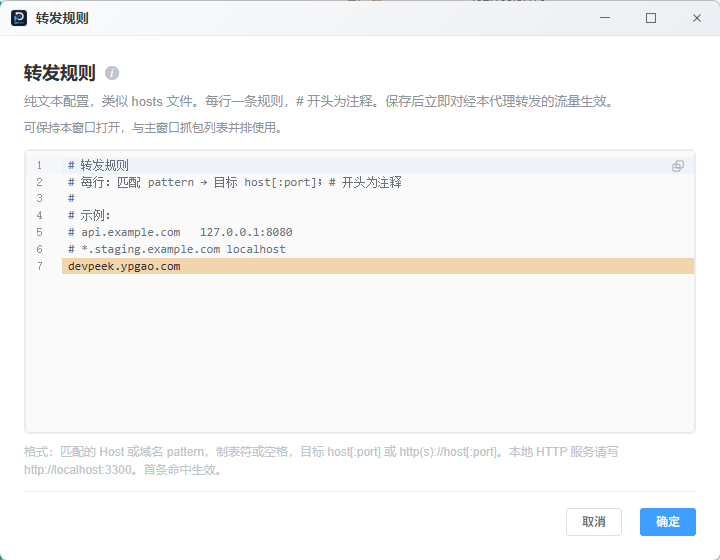
Entry 1: title bar Proxy → **Forward rules** (standalone window, can sit beside Capture).
- Entry 2: Capture left rail **Forward** panel—toggle rows, add/edit (synced with plain text).
- Entry 3: list or detail context menu **Forward to…**—prefills the request Host and highlights the matching line.
- Capture **Overview** shows **Forwarded URL** when a session hit a rule; click to open the editor on that line.
- Rules export/import with app config; saves apply to new connections immediately.
Sidebar and text editor share one config—use either.
**Proxy → Forward rules** plain-text window: one Host or Host + Path mapping per line; can sit beside Capture.
In capture
Rows still show the client’s original host/URL for filtering and search. When forwarded, **Overview** adds **Forwarded URL** (full upstream URL including path) so you can see where the request actually went.
Mock still matches URLs you see in capture. If Mock or Debug API should hit the forwarded service, confirm the forward target is correct.
Filters, response search, and resend all work on forwarded sessions—see Capture UI & requests.
For page debugging
Mobile web debugging shares the same proxy. Typical flows:
- Phone H5 still calls `https://api.example.com`; Map Route sends that Host to `http://127.0.0.1:8080` without editing the page.
- The Debug tab mirrors pages loaded through the proxy; the network panel and capture list show the same forwarded hops.
- Combine with Mock: Map Route to a local stub, then Mock specific paths—no public deploy needed.
Proxy, certificate trust, and SSL scope still required first—see Mobile web debugging.
Combine with other features
Typical joint-debug flow: set up forwarding (point to localhost) → add param transform if needed (read plaintext) → enable Mock if needed (fake responses). If the target is wrong, check **Forwarded URL** in Overview.
HTTPS, SSL decrypt, and local HTTP
For client HTTPS, DevPeek decrypts first (host must be in the SSL allowlist), then applies forward rules. When pointing at a local HTTP service, use an `http://` target.
If nothing answers after forward: verify the local listener, firewall, and that the **phone** trusts the DevPeek CA—not only the PC.
Limits
- Affects **new requests** after you save; refresh the page or restart the app if an open session still hits the old target.
- Rules are not merged. Longest Path prefix wins; for equal specificity, keep the preferred rule first.
- Map Route changes scheme and upstream host:port only. Original Path and Query continue to the target; the matched prefix is not stripped automatically.
Troubleshooting
- Rule ignored: saved? pattern matches Host? line commented with `#`?
- Still hits production: earlier rule matched? clear connections and retry.
- HTTPS page to local HTTP fails: use `http://` target; check SSL allowlist and certs.
- No Forwarded URL in Overview: no enabled rule hit, or target equals original host:port.
Map Route steers production hostnames to your machine or staging—use only with authorization; do not point third-party domains at untrusted services.