
Param transform
Param transform **automatically** decrypts encrypted parameters into readable plaintext so you barely notice ciphertext in day-to-day joint debugging. Once configured, DevPeek defaults to plaintext in capture details, Mock, and **Debug API**—and re-encrypts before send or tamper. The capture list still shows what the client originally sent; decrypted content appears separately in details for comparison.
Design goal: work in plaintext
The core experience is “configure once, plaintext everywhere”—no manual decode/paste in Postman-like tools, and no duplicate decrypt scripts in Mock rules.
- Capture details show decrypted query/body fields; expand the ciphertext view only when you need to compare.
- Mock tamper and **Debug API**: rows bound to transform rules show **editable plaintext** by default; DevPeek writes ciphertext back before Continue or Send.
- When creating Mock rules, you can pick decrypted plaintext values as match conditions.
Surfaces that speak plaintext
With a complete setup (including optional re-encrypt), these flows stay plaintext-first:
- **Capture details · Transform tab**: lists each hit’s original value and decrypted output for verification.
- **Mock tamper dialog**: query / JSON body rows with bound rules edit in plaintext; ciphertext is written back automatically before Continue.
- **Debug API** (detail **Debug** or list menu): prefilled from the current row—edit plaintext, then Send; DevPeek encrypts and updates the response snapshot in the drawer.
- **Page debug · Network panel**: inspect proxied requests and transform output; to resend with edits, switch to Capture, select the same row, and open **Debug API**—**no** copy/paste into an external API client.
When re-encrypt is required
To **edit** plaintext in Mock or Debug API and hit the server, enable **re-encrypt** in the conversion config and set up the matching encrypt logic (or pick a two-way built-in). One-way decrypt-only configs still show read-only plaintext in details but cannot write back after edits.
Two layers
DevPeek separates **how to encrypt/decrypt** from **which request parameter to transform**:
- **Encrypt/decrypt config**: algorithms or scripts shared across many transform rules.
- **Param transform rules**: which requests and parameters to transform, linked to one encrypt/decrypt config.
- Hits produce plaintext for details, Mock, and Debug API; what the client actually sent stays unchanged unless you edit via Mock or Debug API.
Encrypt/decrypt config
Maintain under **Proxy → Encrypt/decrypt config**. Two kinds:
- **Built-in**: pick common algorithms and fill decrypt/encrypt params; some built-ins are one-way (view-only).
- **Script**: JavaScript decrypt/encrypt logic (see Script API below); decrypt-only or optional re-encrypt when you edit and send.
Configs export/import with the app; edits or disabling affect every rule that references them.
**Proxy → Encrypt/decrypt config**: add built-in or script conversions for param transform rules to reference.
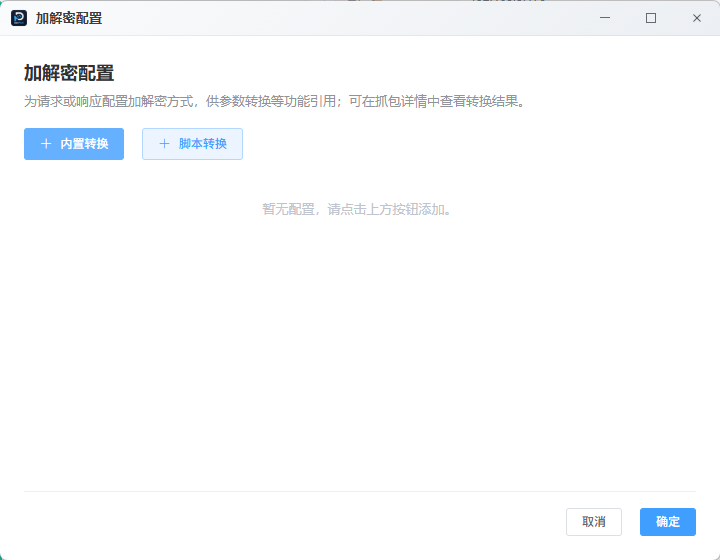
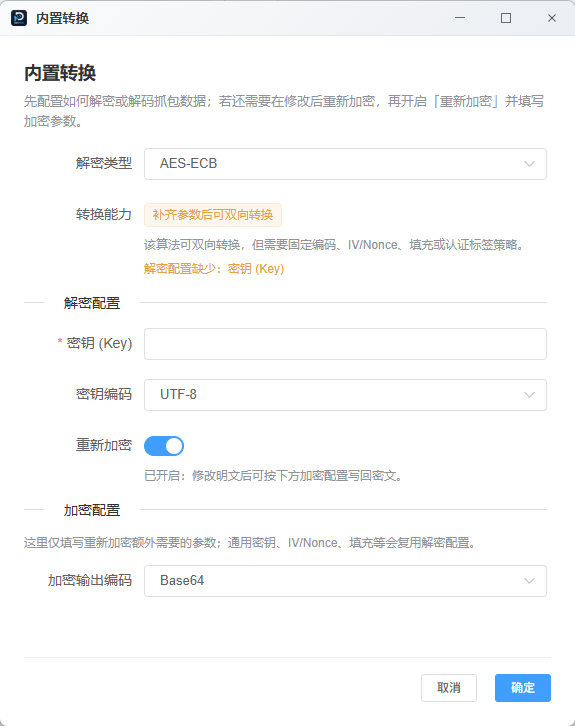
Built-in conversion: pick an algorithm and fill keys; enable **Re-encrypt** to edit plaintext in Mock and Debug API.
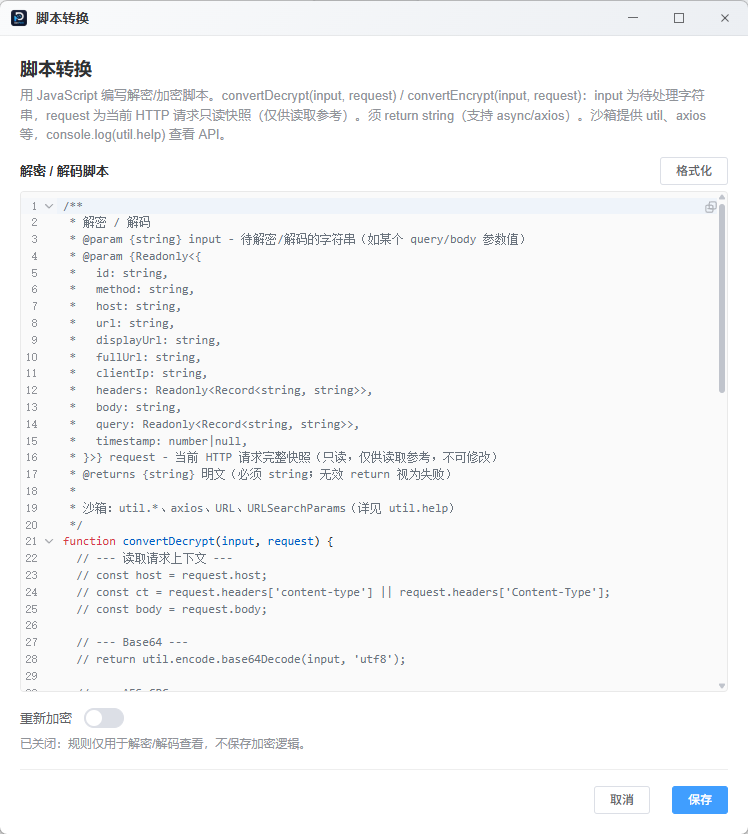
Script conversion: write decrypt/encrypt logic in JavaScript; the editor shows available APIs and examples.
Script API (when writing conversion scripts)
Scripts run in an isolated environment and must return a string; async/await and outbound HTTP are supported.
- Decrypt function: takes the ciphertext param string and a read-only snapshot of the current request; returns plaintext.
- Encrypt function (optional): when re-encrypt is on, turns edited plaintext back into encrypted format.
- Built-in crypto/encoding helpers are available; use the editor help command for full API names and signatures.
Example
function convertDecrypt(input, request) {
  // input: ciphertext param string; request: read-only HTTP snapshot
  var decoded = atob(input)
  return decoded
}

function convertEncrypt(input, request) {
  // optional: re-encrypt plaintext after resend or tamper
  return btoa(input)
}
Transform rules
Each rule has **match conditions** and a **transform target**:
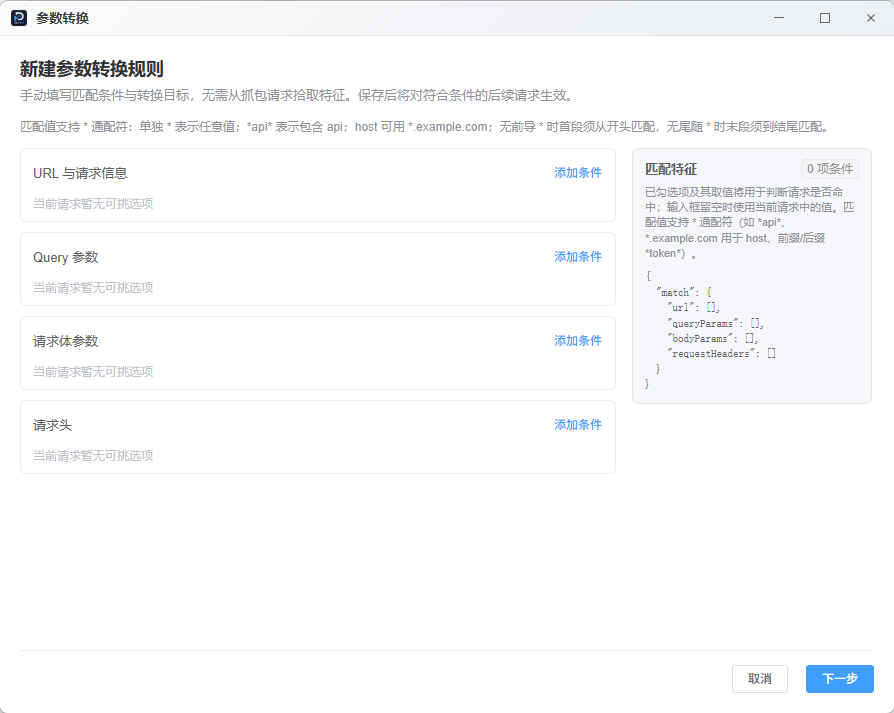
- **Match**: URL facets (method, host, path…), query, body fields, or headers with values; `*` wildcards supported (`*api*`, `*.example.com`).
- **Target**: one query or body param plus a linked conversion config; the wizard can preview decrypt output to validate the config.
- One request may hit multiple rules; each result is listed separately under the Transform tab in details.
Create and manage
- Right-click a row in capture → **Param transform**, pick features in the wizard, and save (or edit an existing hit / create new).
- Open **Proxy → Param transform rules** to list, enable/disable, edit, or **Add rule** manually without picking from a row.
- Enabled rules run on later matching requests automatically.
New param transform rule wizard: fill URL, query, body, or header match conditions and link an encrypt/decrypt config.
Entry: title bar Proxy → Encrypt/decrypt config / Param transform rules.
In capture details
Request/response body areas gain a **Transform** inner tab listing each hit: original value, decrypted output, success/failure—use output (plaintext) for everyday inspection.
The **Debug API** drawer recognizes bound rules when editing query/JSON body rows: the UI defaults to plaintext editors; DevPeek encrypts automatically before the request leaves the app—no manual ciphertext handling.
Use with Mock and Map Route
For encrypted params, set up param transform first, then match Mock on decrypted fields. Map Route only changes where requests go; Mock still matches the URL you see in capture—confirm the forward target when combining features.
Troubleshooting
- Transform failed in details: check the conversion config is enabled, the script returns a valid string, and the param value is non-empty.
- Mock misses plaintext: ensure transform rules are enabled and hit first; verify Mock features use the right keys.
- Manual rules have no preview until a real session hits—expected; save and verify on live traffic.
Conversion scripts may handle sensitive data—configure only on authorized test environments; avoid production secrets in exportable config.