
H5 Debug in Practice
H5 Debug in Practice (2): Android WebView White Screen—From Console Remote Debug to Mock Validation
White screen
It happened during a campaign H5 stress test.
QA posted a screen recording in the group:
"Samsung S23, Android 14, opened the campaign page in WeChat, tapped Join Now—screen goes white."
What made it tricky was that the page wasn't completely broken.
It loaded fine:
- Home content displayed normally;
- The button was tappable;
- Loading appeared after tapping;
But then the screen went white.
iOS was fine. Other Android devices were fine too.
First suspects:
- JavaScript runtime error?
- API response breaking the render?
- Android WebView compatibility issue?
Started with the network layer.
Capture looked normal, page still crashed
First, the API request.
POST /api/campaign/join
Returned:
200 OK
Request params checked out. Response structure was as expected.
At least the API wasn't the problem.
But the page was still white.
This is the tricky kind of issue: the request succeeded, the page loaded, but something failed mid-execution.
Without runtime logs, you're guessing.
vConsole and Remote Debug weren't a good fit here
For H5 debugging, vConsole is usually the first thought.
But this campaign page was already live. We couldn't repack it with vConsole injected.
And the issue only happened on specific Android devices.
Chrome Remote Debug was tried too:
chrome://inspect
It could connect to the WebView.
But the error happened after the button tap. By the time the page refreshed, the error was gone.
On top of that:
- WebView debug flag requires client-side support;
- USB connection has environment dependencies;
- The live version couldn't be repeatedly adjusted.
The problem was: the WeChat WebView on the phone had already hit an error, and I needed to see what it saw at runtime.
Get the WebView Console first
The test device connected to DevPeek through the proxy.
Steps completed:
- Install the HTTPS certificate;
- Configure the proxy;
- Enable SSL decryption for the target domain.
Full checklist: mobile web debugging; if the preview stays on "Waiting for device connection", check the FAQ.
In the DevPeek Debug tab, select the device. QA reopened the campaign page.
A red line appeared immediately in the Console:
Uncaught TypeError:
e.isIntersecting is not a function

at IntersectionObserver polyfill
(chunk-vendors.js:1847)
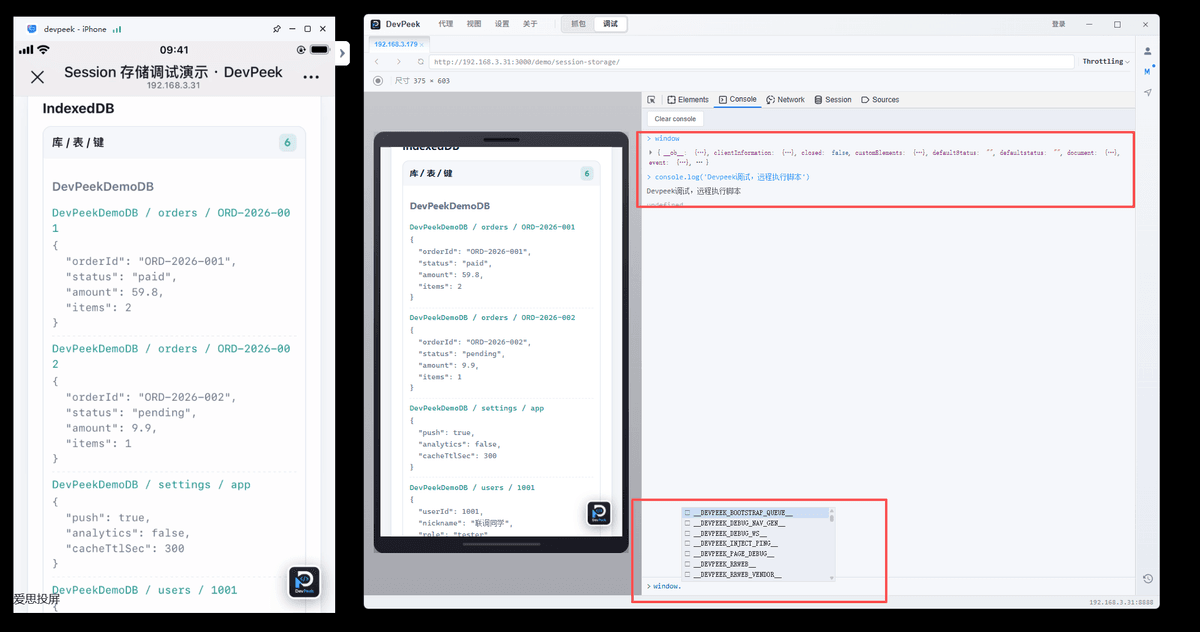
Real device console output streams to the debug panel.
The direction was clear.
Root cause: polyfill overrode the native implementation
This involves IntersectionObserver.
Android 14's WebView natively supports this API.
But the project still loaded an old polyfill, which overrode the native implementation.
So the page wasn't running the native IntersectionObserver—it was running the polyfill. The two implementations had compatibility differences.
A quick remote eval in Console confirmed it:
navigator.userAgent.match(/Android\s([\d.]+)/)?.[1];
// "14"  ——confirmed Android version

typeof IntersectionObserver;
// "function"  ——confirmed API exists

IntersectionObserver.toString().includes("native code");
// false  ——confirmed not running native implementation
Root cause confirmed.
Issue located, but testing wasn't done
The frontend team started fixing the polyfill.
But the stress test window was still open.
QA needed to confirm: if the API returns error states, does the page fall back correctly?
For example:
- Campaign ended;
- User not authorized;
- Insufficient inventory.
These scenarios can't wait for backend cooperation every time. We needed to simulate API responses.
Using Mock to verify error scenarios
In the DevPeek capture list, find POST /api/campaign/join.
Create a Mock rule.
Match conditions:
- URL contains
campaign/join - Method is POST
Response modification:
{
  "code": 10086,
  "message": "Campaign ended"
}
Save and enable.
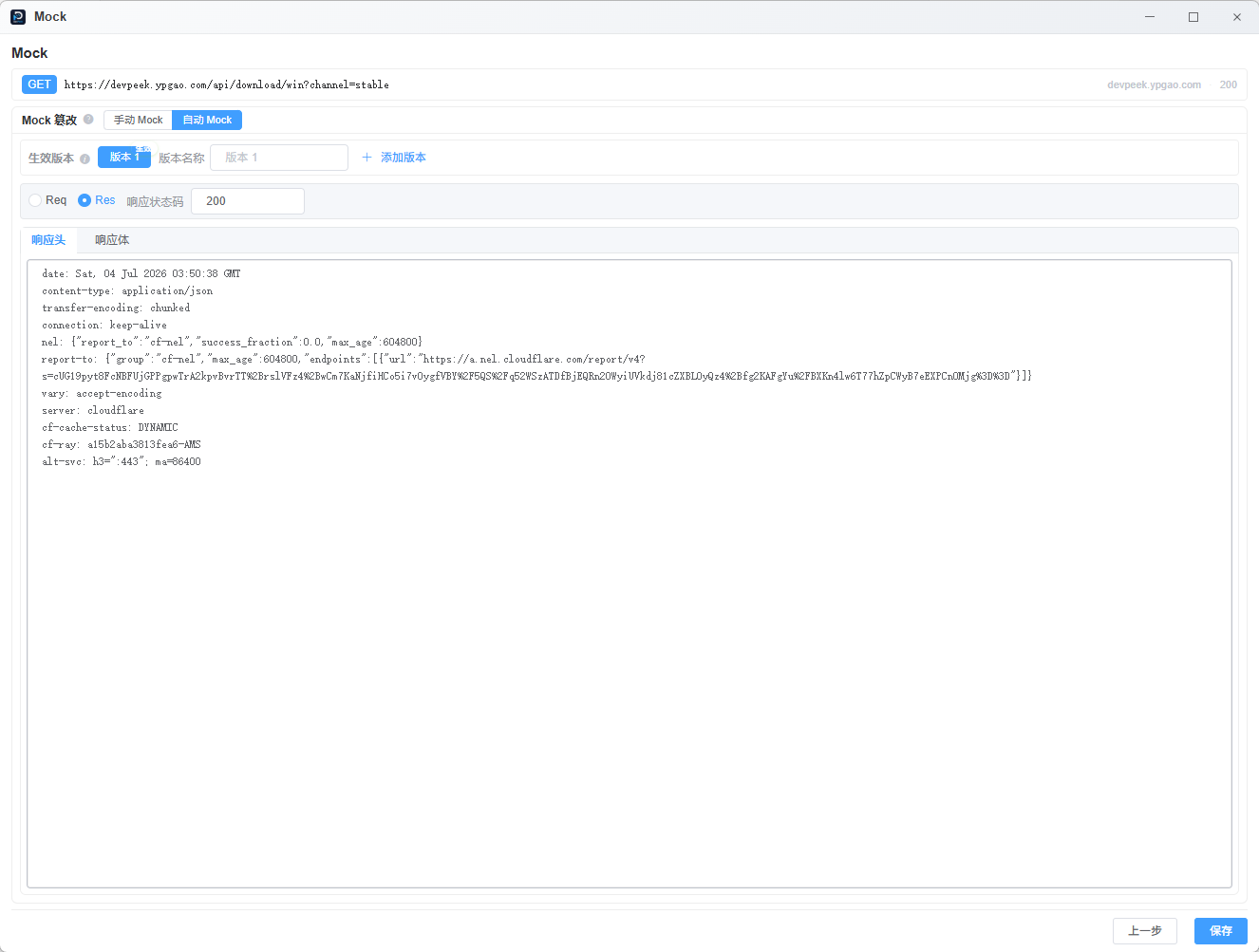
Mock rules take effect immediately, no proxy restart.
QA tapped the button again.
This time, no white screen. The page showed "Campaign ended" as expected.
Fallback logic verified.
To test other error scenarios, for example:
{
  "code": 10010,
  "message": "Campaign not available"
}
Just update the Mock response and quickly verify different error states.
No need to:
- Modify the backend API;
- Wait for API deployment;
- Repack the H5.
Mock rules are persistent—they survive closing and reopening DevPeek. Remember to disable or delete temporary rules after the session.
The full investigation flow
The complete debug chain for this case:
Button tap
    ↓
Capture confirms API returned 200
    ↓
Console captures WebView runtime error
    ↓
Remote eval confirms polyfill override
    ↓
Fix confirmed
    ↓
Mock simulates error API responses
    ↓
Fallback UI verified
Throughout the entire process, no H5 repack was needed, and no client-side debug mode was required.
Why this went smoothly
In similar past situations, multiple tools were usually needed:
- Capture tool to confirm requests;
- vConsole to check runtime logs;
- Another tool to modify API responses.
Each tool solved part of the problem.
But during investigation, you'd often wonder:
- Where was that error log again?
- What did that API return?
- Did the phone re-trigger the request after the Mock change?
Information was scattered across different tools.
This time, everything was on the same debug chain:
Network
   ↓
Console
   ↓
Mock
   ↓
Real device page
For mobile H5 debugging, fewer tool switches means less context loss—and that alone reduces investigation cost.
Limitations
Console and Mock aren't silver bullets. Full boundaries: mobile web debugging.
1. Page completely crashed
Infinite loops, stack overflow, main thread blocking—the injected debug script may not connect either. Fall back to resource loading and network checks.
2. iframe pages
Console runs in the current page context by default. If the issue is inside an iframe, open that URL separately.
3. Mock may not intercept all requests
Mock depends on the proxy chain. Service Worker cache, native network interception, or certain WebView kernel behaviors may bypass it. Verify the request goes through the proxy.
4. Remote eval context
Remote scripts share the page's execution context. Quick checks are fine, but avoid heavy IndexedDB iteration or long synchronous tasks—use async patterns instead.
If you often run into "API OK, page broken" scenarios, Android WebView compatibility issues, or can't directly debug production H5, try DevPeek or discuss on GitHub Discussions.