
API Debugging New Tricks
New API Is Live, Frontend Hasn't Shipped? Debug with Forward Rules
A half-finished microservice split is a joint-debug scenario almost every team runs into.
The backend has moved orders to b.api.example.com, but production H5 still calls a.api.example.com. Profile works, order stats work, and the order list alone returns 501.
The API isn't broken—the frontend and backend simply haven't shipped in the same release yet.
Waiting for the full migration and a frontend release before re-testing often means scheduling delay. During the integration window, the practical move is: keep the browser on the old API and configure DevPeek "Forward Rules" at the proxy layer to route specific paths to the new host; if the new service isn't reachable yet, use Mock to short-circuit responses and validate the UI.
This article walks through the mock-map-route-demo case in devpeek.demo: Forward Rules vs Mock, plus how to write path prefixes, port matching, and port inheritance in a rule.
Who This Is For
- Teams mid API host migration who can't change the frontend base URL yet
- DevPeek users who capture traffic and want to try Forward Rules or Mock
- Readers of the Param Transform article curious what else the proxy chain can do
- First-time capture: start with Install DevPeek and Capture Your First Request (Chinese; English docs: Quick Start)
Prerequisites: Proxy, Certificate, System Proxy
This demo runs in a local browser. Traffic must go through DevPeek before Forward Rules take effect.
- Install DevPeek and note the proxy port (title bar / settings).
- Set system proxy: menu Proxy → Set as system proxy (local browser capture; for a phone, set Wi‑Fi proxy—see Quick Start).
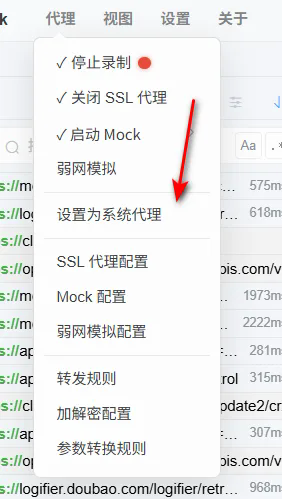
For local debugging, turn on system proxy from the DevPeek menu.
- Install and trust the root CA: DevPeek → Certificate Manager, install into Trusted Root Certification Authorities. Without it, HTTPS shows CONNECT tunnels only—not decrypted requests/responses. Full steps: Proxy & SSL certificates (and the Chinese first-capture walkthrough if helpful).
- (Optional) For HTTPS business hosts, add them to SSL decrypt scope (this demo uses
http://*.demo.test:3002—plain HTTP, skip this).
Done when: Opening any page produces HTTP(S) rows in the DevPeek capture list.
Scenario: Three Hosts, One Server
The demo runs Express on :3002 and uses the Host header to distinguish page, old API, and new API—a typical API migration in-between state:
| Host | Role |
|---|---|
page.demo.test |
H5 page |
a.api.demo.test |
Hard-coded API in frontend (old) |
b.api.demo.test |
Orders live here (new) |
Behavior (simplified):
| Endpoint | a.api | b.api |
|---|---|---|
GET /api/user/profile |
✅ 200 | ✅ 200 |
GET /api/orders/stats |
✅ 200 | ✅ 200 |
GET /api/orders/list |
❌ 501 | ✅ 200 |
All three calls in script.js target http://a.api.demo.test:3002/.... With no Forward Rules, the orders section shows 501—normal mid-split pain.
Step 1: Run the Demo
git clone https://github.com/GYPengDev/devpeek.demo.git
cd devpeek.demo
pnpm install
pnpm --filter @devpeek/mock-map-route-demo dev
hosts (all three point to localhost):
127.0.0.1 page.demo.test a.api.demo.test b.api.demo.test
Open http://page.demo.test:3002/ and click 🔄 Re-check.
Do not enable any Forward Rules yet—confirm the baseline: orders 501 on the old host.
Done when: Profile and stats load; orders show a.api — 501 Not Implemented; progress stops at step 1.
In the capture list, a.api.demo.test /api/orders/list still returns 501:
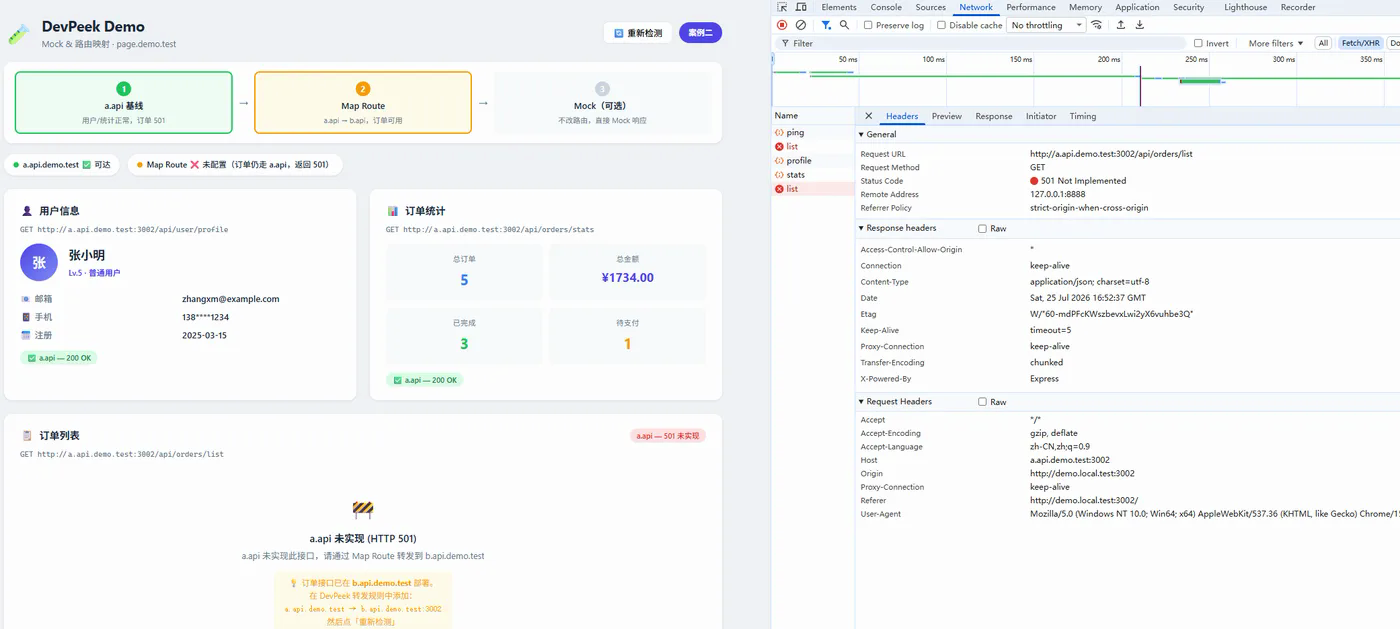
Host in the list is still a.api; orders return 501.
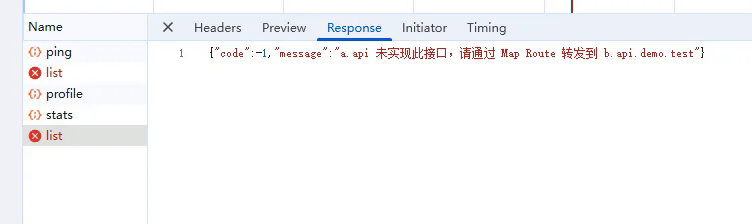
Body says a.api doesn't implement the endpoint—route to b.api via Forward Rules.
Step 2: Forward Rules — Orders Path Only
Entry: Rules → Forward Rules (or the Forward panel on the capture sidebar).
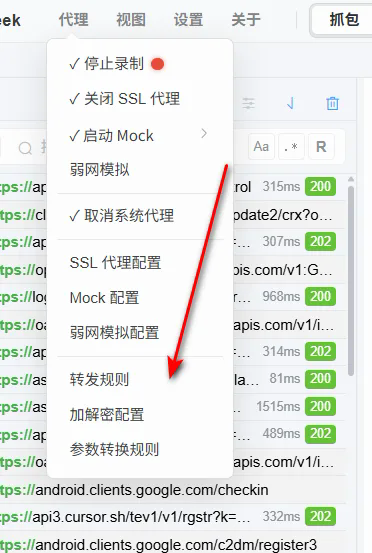
Add one line (tab or space separated):
a.api.demo.test:3002/api/orders b.api.demo.test/api/orders
This rule means:
- Pattern with
:3002matches onlyHost: a.api.demo.test:3002; omit port to match any port. - Target without port inherits the request port (3002 here)—no need to repeat
:3002on both sides. - Only
/api/ordersand sub-paths (e.g./api/orders/list) match;/api/user/profilestays on a.api.
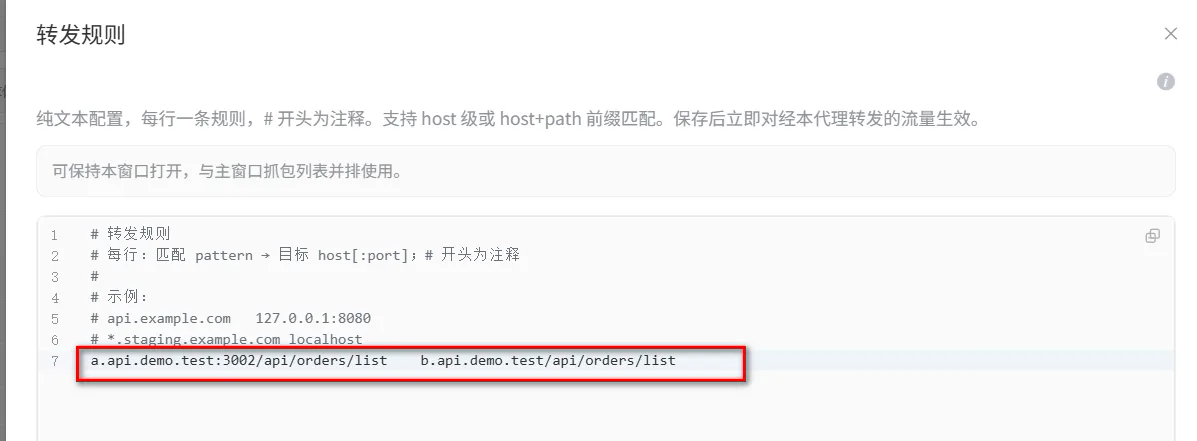
Pattern includes :3002; target is host-only—the upstream port comes from the request.
After saving, a path-level rule looks like:
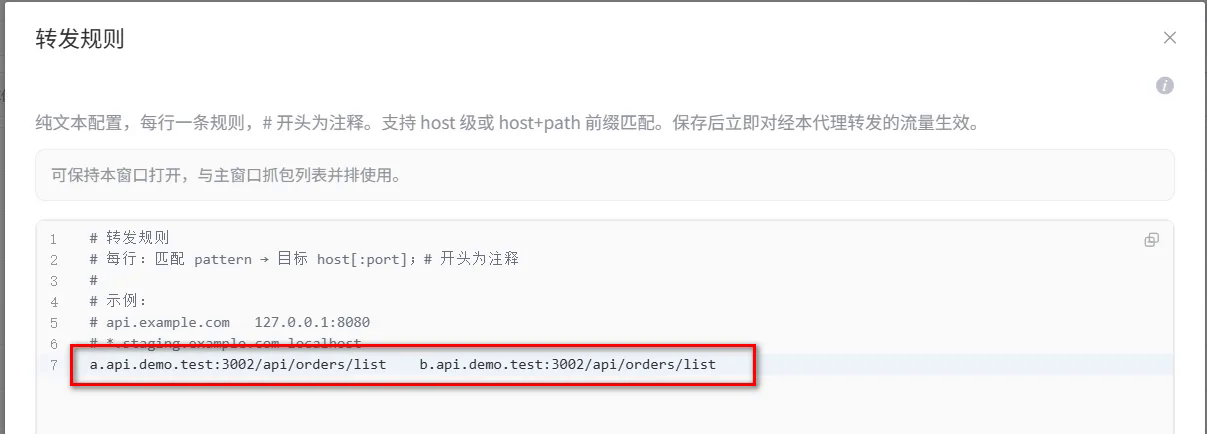
Forwards /api/orders and below only; profile still hits a.api.
If the whole API has moved to the new host, use a host-level rule—all sub-paths on a map 1:1 to b:
a.api.demo.test:3002 b.api.demo.test
(Target may omit port here too—it inherits from the request.)
Confirm system proxy is on (above), then click Re-check on the page.
Done when: Order table renders; UI shows forwarding is active; terminal log similar to:
→ [GET] Host: b.api.demo.test:3002 /api/orders/list
Capture Overview shows Forwarded URL—the real upstream is b.api while the list still shows the client's original URL. See Forward Rules docs.
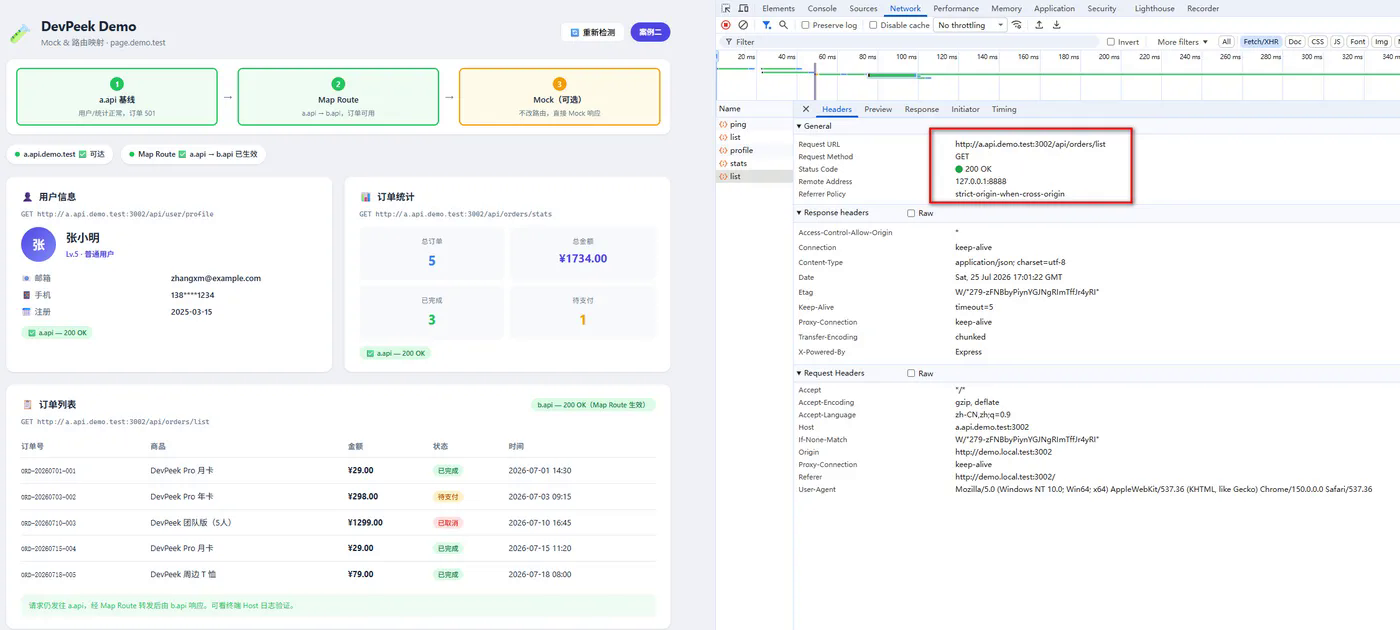
Same request: list still shows a.api; detail reveals the upstream.
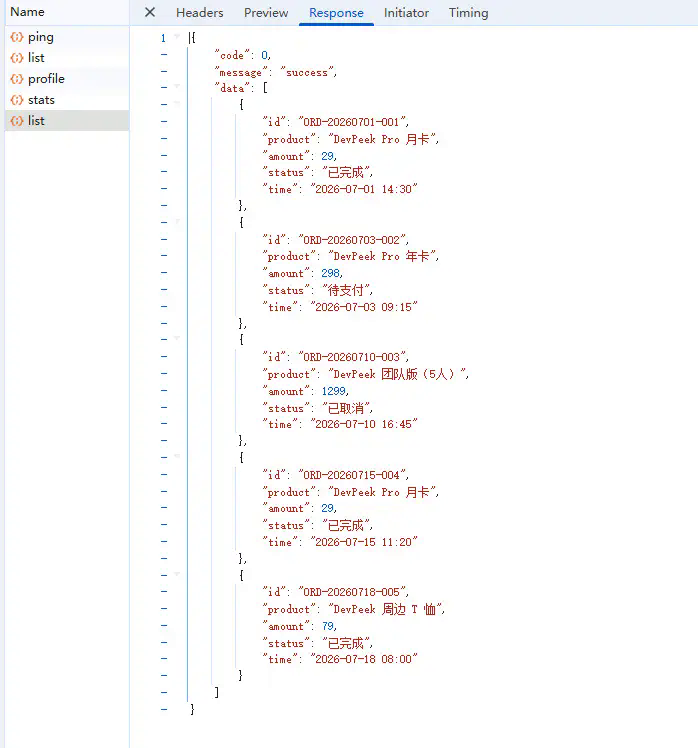
Overview Forwarded URL points to b.api.demo.test:3002.
Step 3 (Optional): Mock — New Service Not Up Yet
If b.api isn't reachable but you need to validate the orders UI, add an auto Mock for GET .../api/orders/list with sample JSON (see Mock fallback at the bottom of the demo page).
Forward Rules vs Mock
Many teams new to microservice integration ask: Forward Rules or Mock?
| Forward Rules | Mock | |
|---|---|---|
| Hits real upstream | ✅ Yes | ❌ No (short-circuit) |
| Typical use | New service ready; API forwarding | Migration incomplete; validate UI |
| Match on | host + path + port | Mock rules (URL, Method, …) |
Forward Rules actually connect to the new service—good when the new host is deployed but the frontend hasn't shipped. Mock skips upstream—good when the service isn't ready and you only need the UI.
Combine both: Forward Rules to a test machine, then Mock an error on a path. See Mock rules.
Forward Rules Syntax
Each rule has Pattern (match address) and Target (destination):
Pattern → Target
Address format:
[http(s)://]host[:port][/pathPrefix]
| Dimension | Pattern (match) | Target |
|---|---|---|
| port | If set, must equal request port; if omitted, any port | If set, fixed; if omitted, inherits request Host port |
| path | If set, prefix + sub-paths only; if omitted, whole host | May differ from Pattern for path rewrite |
| scheme | If http:// / https:// set, must match request |
Use http:// when pointing at local HTTP |
Priority: Longest path prefix wins; same path, rules with explicit port rank higher.
Path rewrite (advanced):
a.example.com/route1/route2 b.example.com/route1
Request /route1/route2/orders/list → upstream /route1/orders/list (strip match prefix, append remainder to target prefix).
CONNECT tunnels use host-only rules (no path); path rules apply to HTTP(S) only.
Same Chain as Capture and Page Debug
Forward Rules change only the proxy upstream target—they do not change the URL the browser sends. The capture list still shows the client's Host and path. So:
- Mock still matches URLs as shown in capture;
- Taps in mobile web debugging go through the same forwarding;
- With Param Transform: forward to test env → decrypt → Mock errors.
Typical API integration flow: Forward Rules (right service) → Param Transform (plaintext) → Mock (edge cases).
Troubleshooting
Orders still 501
- Are Forward Rules saved and not commented out (leading
#)? - Is system proxy on?
- Path correct? Orders are
/api/orders/list—Pattern prefix must cover at least/api/orders. - Local dev port: Pattern should include
:3002, or Host must match the rule.
Profile / stats broken too
- Host-level forward sends everything to b—ensure profile/stats work there, or use path-level forward for
/api/ordersonly. - Check hosts includes
a.api.demo.test.
No Forwarded URL in Overview
- No rule matched, or target host:port equals original (treated as no forward). See FAQ.
Next
HTTPS Capture Breaks a Few Sites? Add Them to Skip SSL Proxy—if direct access works but SSL proxying kills a host, Exclude it; do not turn off HTTPS capture for everything.
If you've hit "backend moved, frontend hasn't shipped" during joint debug, try DevPeek: run this demo from Forward Rules through Mock without changing frontend code. Source: devpeek.demo / mock-map-route-demo. Share your API host migration setup on GitHub Discussions.